
EMAIL & CUSTOMER OPERATIONS
Email lifecycle automation
A connected system for subscriber management, campaign creation, scheduled follow-ups and reporting.
THE BUSINESS CHALLENGE
Less manual work.
More connected systems.
When signup forms, subscriber lists and follow-ups live in separate places, running a campaign becomes a series of manual handoffs.
Five n8n workflows bring the lifecycle together around a shared Google Sheets data model, with Gmail delivery and an optional Claude drafting route.
Inside the actual workflows.
Choose a workflow, zoom into the nodes and follow the connections in the original build.
Subscriber management
Add, list, update, segment and import subscribers through separate action routes.
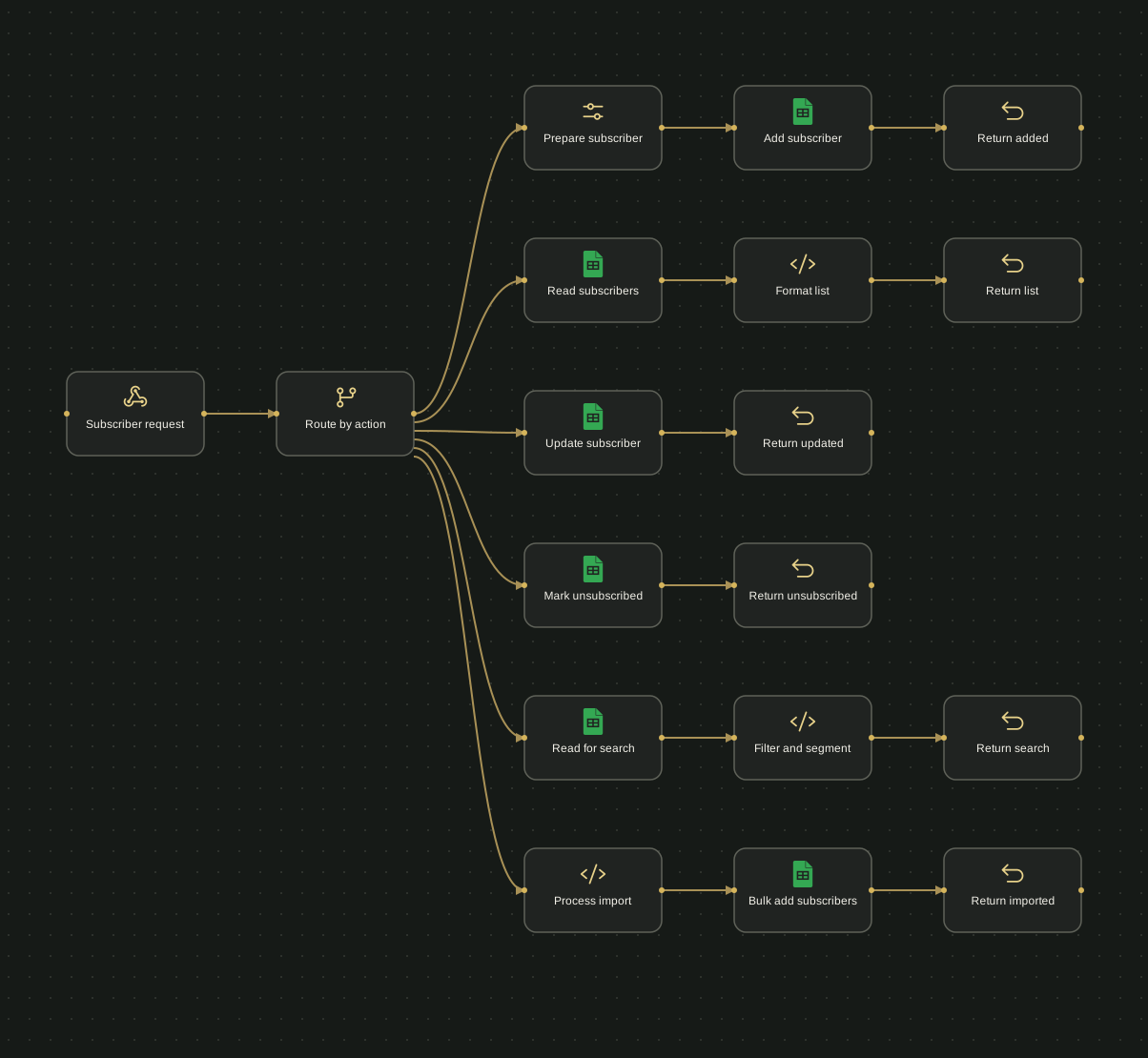
Scroll to follow the workflow, or choose Fit for the full overview. Rendered from the original n8n export with original node positions and connections. Labels are anonymised; private configuration is omitted. Dashed connections represent AI model or tool links.
Read the workflow as text 18 nodes
- Subscriber requestWebhook
Route by action (output 1)
- Route by actionRouter
Prepare subscriber (output 1); Read subscribers (output 2); Update subscriber (output 3); Mark unsubscribed (output 4); Read for search (output 5); Process import (output 6)
- Prepare subscriberConfiguration
Add subscriber (output 1)
- Add subscriberGoogle Sheets
Return added (output 1)
- Return addedResponse
No outgoing connections in this export.
- Read subscribersGoogle Sheets
Format list (output 1)
- Format listCode
Return list (output 1)
- Return listResponse
No outgoing connections in this export.
- Update subscriberGoogle Sheets
Return updated (output 1)
- Return updatedResponse
No outgoing connections in this export.
- Mark unsubscribedGoogle Sheets
Return unsubscribed (output 1)
- Return unsubscribedResponse
No outgoing connections in this export.
- Read for searchGoogle Sheets
Filter and segment (output 1)
- Filter and segmentCode
Return search (output 1)
- Return searchResponse
No outgoing connections in this export.
- Process importCode
Bulk add subscribers (output 1)
- Bulk add subscribersGoogle Sheets
Return imported (output 1)
- Return importedResponse
No outgoing connections in this export.
WHAT WAS BUILT
The useful details.
Selected implementation work by our founder.
- Separate subscriber routes for adding, updating, searching, segmenting and importing records.
- Campaign drafts, previews and batched sending with active-status and tag filters.
- Scheduled sequence checks using subscriber status, step order and elapsed time.
- Signup, confirmation and unsubscribe handling, plus event logs and daily reports.
TOOLS & IMPLEMENTATION
Behind the work.
- n8n
- Google Sheets
- Gmail
- Claude
- JavaScript
 n8n
n8n Google Sheets
 Gmail
Gmail Claude
 JavaScript
Useful for a business that wants its subscriber list, welcome emails and campaign operations to work together.
Build status
Five implementation exports were reviewed. Provider credentials, sender setup and end-to-end delivery still require configuration and testing. These maps show the implemented workflow structure; they do not represent a verified live campaign.
No live executions or measured business results are presented in this portfolio.HAVE A SIMILAR PROCESS?