
SELECTED WORK / 04
Invoice Reconciliation Automation
Invoice comparison and review workflows that keep payment approval with a person.
THE CHALLENGE
Review the exceptions. Keep control.
Matching invoice details across documents and financial tools is repetitive. Discrepancies need attention, while approval needs a clear owner.
Separate extraction and comparison from approval. Use deterministic checks to identify discrepancies, build review information and track the document’s status.
Find the exception, keep human reviewShort screen recording · On-screen explanations · Sample data
What this walkthrough shows
Filter the check queue and inspect a sample invoice with a $50 difference.
Save a reviewer note and inspect the prepared run stages. No payment or n8n execution takes place.
Recorded from the interactive portfolio edition. Anonymous sample data; no live backend or external service is used.EXPLORE THE PRODUCT
See the product in action.
Explore a working portfolio edition based on the project’s functionality, or open it at full size.
Portfolio interface based on reviewed project functionality, using anonymous content and sample data. Explore the screens and try the controls. Changes stay in this preview and reset on reload.
The workflows behind the interface.
Inspect the original reconciliation and approval-sync structures. The direct approval node remains visibly disabled, and the notification step is identified as a placeholder.
Invoice reconciliation
Extract invoices, compare records and route discrepancies or cleared bills for review. The direct approval node is disabled in the original export.
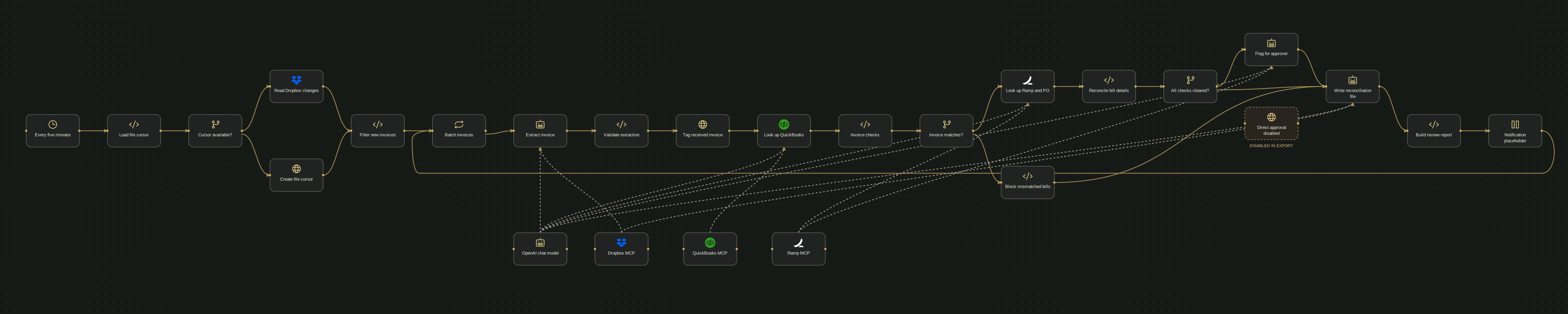
Scroll to follow the workflow, or choose Fit for the full overview. Rendered from the original n8n export with original node positions and connections. Labels are anonymised; private configuration is omitted. Dashed connections represent AI model or tool links.
Read the workflow as text 26 nodes
- Every five minutesSchedule
Load file cursor (output 1)
- Load file cursorCode
Cursor available? (output 1)
- Cursor available?Condition
Read Dropbox changes (output 1); Create file cursor (output 2)
- Read Dropbox changesHTTP request
Filter new invoices (output 1)
- Create file cursorHTTP request
Filter new invoices (output 1)
- Filter new invoicesCode
Batch invoices (output 1)
- Batch invoicesBatch
Extract invoice (output 2)
- Extract invoiceAI agent
Validate extraction (output 1)
- Validate extractionCode
Tag received invoice (output 1)
- Tag received invoiceHTTP request
Look up QuickBooks (output 1)
- Look up QuickBooksAI agent
Invoice checks (output 1)
- Invoice checksCode
Invoice matches? (output 1)
- Invoice matches?Condition
Look up Ramp and PO (output 1); Block mismatched bills (output 2)
- Look up Ramp and POAI agent
Reconcile bill details (output 1)
- Reconcile bill detailsCode
All checks cleared? (output 1)
- Block mismatched billsCode
Write reconciliation file (output 1)
- All checks cleared?Condition
Flag for approver (output 1); Write reconciliation file (output 2)
- Flag for approverAI agent
Write reconciliation file (output 1)
- Direct approval disabled — disabled in sourceHTTP request
No outgoing connections in this export.
- Write reconciliation fileAI agent
Build review report (output 1)
- Build review reportCode
Notification placeholder (output 1)
- Notification placeholderPlaceholder · connection not implemented
Batch invoices (output 1)
- OpenAI chat modelChat model
Extract invoice (AI model link); Look up QuickBooks (AI model link); Look up Ramp and PO (AI model link); Flag for approver (AI model link); Write reconciliation file (AI model link)
- Dropbox MCPMCP tool
Extract invoice (AI tool link); Write reconciliation file (AI tool link)
- QuickBooks MCPMCP tool
Look up QuickBooks (AI tool link)
- Ramp MCPMCP tool
Look up Ramp and PO (AI tool link); Flag for approver (AI tool link)
WHAT WAS BUILT
The pieces that
make it useful.
Selected work by our founder.
Reconciliation workflow and review-dashboard implementation.
- Invoice extraction and comparison definitions
- Deterministic matching and exception gates
- Approval-status synchronization workflow
- Report-building steps and an AP dashboard
- 01Compare records
- 02Flag exceptions
- 03Human review
TOOLS & IMPLEMENTATION
Behind the work.
- n8n
- Next.js
- Supabase
- Dropbox
- QuickBooks
- Ramp
 n8n
n8n Next.js
 Supabase
 Dropbox
 QuickBooks
 Ramp
RampBuild status
Saved workflows contain configuration placeholders and unfinished notification connections. The direct payment-approval step is disabled. Live integration operation is not claimed.
The case study describes reviewed implementation work. No measured savings, revenue gains or performance improvements are claimed.HAVE A SIMILAR CHALLENGE?